
Floor and Tiles · Documentation
Material IDs
Material IDs for each piece of the pattern and for the grout, for use with a Multi/Sub-Object material.
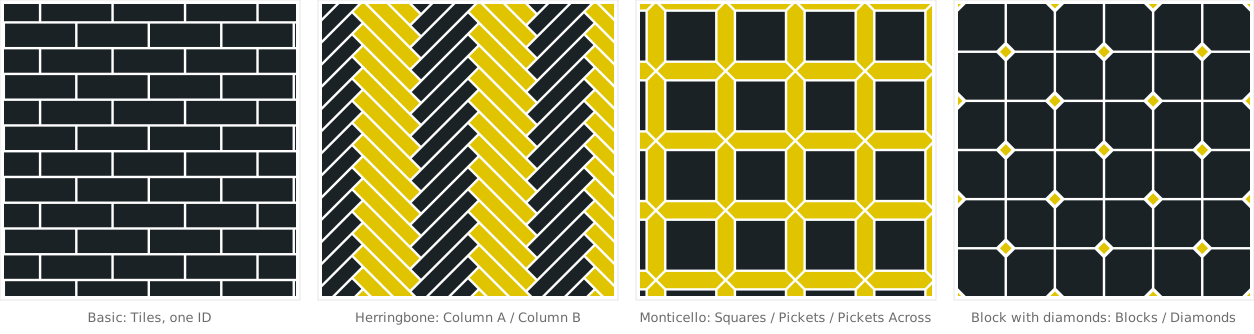
Pieces per pattern
The rollout shows one field per piece of the current pattern.
| Pattern | Pieces |
|---|---|
| Basic, Hexagonal, Penny Round | Tiles |
| Basket Weave | Along, Across, Dots |
| Versailles | Panel, Frame, Between |
| Bordeaux | Triangles, Boards, Pentagons |
| Parquet Panels | Panels A, Panels B, Frames |
| Herringbone, Chevron | Column A, Column B |
| Wave | First, Second, alternating up the column |
| Fish Scale, Camelot, Arabesque | Row A, Row B (Fish Scale variation 3: Scales, Squares) |
| Hex Weave | Hexagons, Planks |
| Shingles | Columns, Slid Columns |
| Pentagon | Large, Small |
| Trapezoid | Upright, Leaning Right, Leaning Left; variation 2: Odd Rows, Even Rows; variation 4: Left Halves, Right Halves, Rhombi |
| Triangle | Point Down, Point Up; variation 2: Large, Small |
| Biscuits | Lying, Standing |
| Shippo | Stars, Petals |
| Clover | First, Second, Third, set so no two neighbours share one |
| Corset | Upright, Turned: one per turn of the tile |
| Block | Blocks; Diamonds with With diamonds on |
| Monticello | Squares, Pickets, Pickets Across |
| Diamond | Light, Dark, Lozenge |
Controls
| Parameter | Description | Default |
|---|---|---|
| Piece fields | Material ID of each piece. Every row starts at 1, 2, 3 regardless of its position in the Areas list. | 1, 2, 3 |
| Randomize, from – to | Assigns each tile a random ID in the range, for example 3 to 6. The piece fields are disabled while it is on. Each tile keeps its ID when the floor changes. The grout keeps its own ID. | off, 3 |
| Neighbours differ | With Randomize: tiles that share a side (not just a corner) never get the same ID. How many IDs that takes depends on the pattern: 3 for Fish Scale, Arabesque or Corset, 4–6 for most, more for Versailles. With too few, the odd pair still matches. | off |
| Grout | Material ID of the grout surface. | 4 |
| Set Nearest Free IDs | Moves this row's IDs to the lowest range not used by other rows of the object. |
IDs are written to every face of a tile. The Planner Pro can override the ID of individual tiles.