IMMERSIVE

Tools for 3ds Max

Gumroad Cart Ig

Floor and Tiles · Documentation

Borders

Turns this row into a band round the floor, and lays it along the walls. Everything here is per row: each border has its own width, corners and starts.

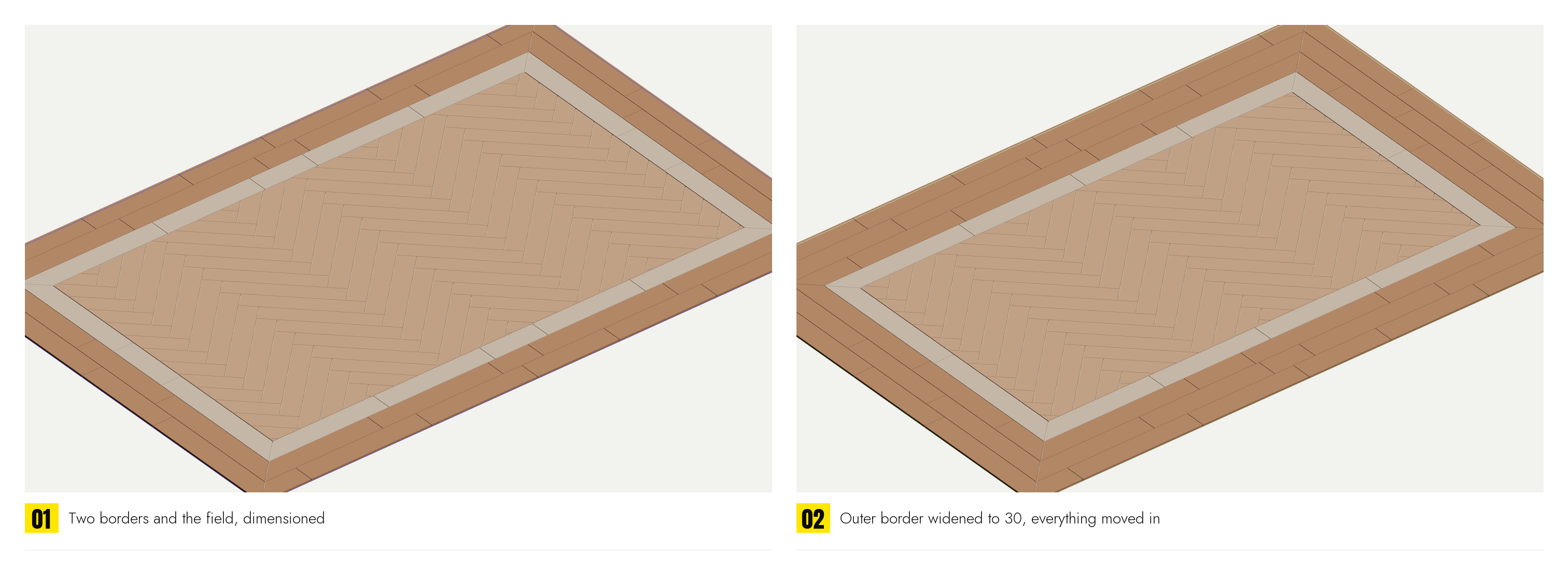
A border is measured in from the edge of the picked outline: where it starts, and how far across it reaches. It is measured from the edge rather than from the band before it, because that is how a drawing is dimensioned, and because one band's numbers then cannot be thrown off by another's. A border, the field, an inner frame and a middle are four rows over one outline, each with its own pattern and material.

The band

Band WidthHow wide this band is. 0 means the rest of the way in, which is what the field uses. Round a hole in the floor the band goes the other way, so a column keeps its own border by the same width.
Band InsetHow far in from the outline this band starts. Greyed while the box below is on, since then it is worked out for you.
Follow the outer borderOn by default. This band starts where the border outside it ends, plus that border's Grout as the joint between them, so widen or narrow any border and every border inside it moves with it, and the field follows the innermost. Untick to type the inset yourself: for a band that leaves a gap to the one outside, or one that overlaps it.

Along the walls

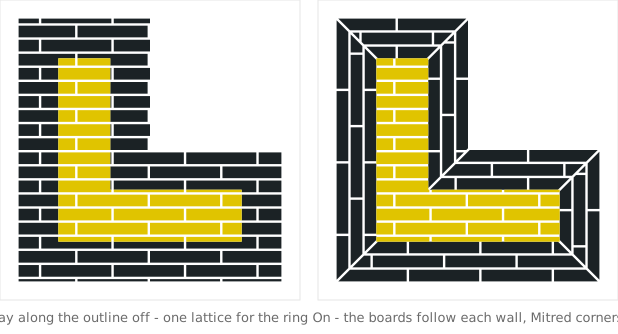
Lay along the outlineOff, the band is tiled from one lattice like any other row and the pattern runs straight through the corners. On, the band is cut into runs, one to a side of the outline, and each run is laid along its own side, so the boards of a border follow the walls round the room. The runs do not overlap and between them they are the band, so two runs never put a tile in the same place.
The same band from one lattice, and cut into runs that follow each wall
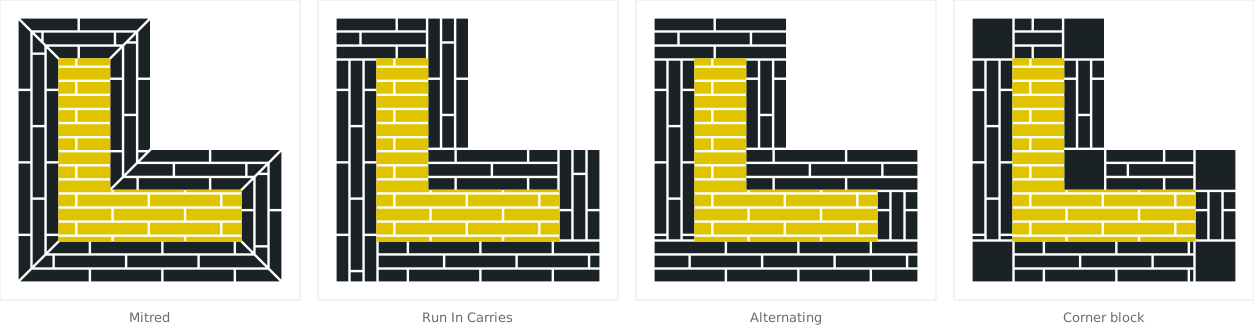
OuterHow the runs meet at an outer corner, where the floor turns outwards. Mitred: split on the bisector, half to each run. Run In Carries: the run arriving keeps the corner, the other stops short of it. Run Out Carries: the run leaving keeps it. Alternating: turn about, corner by corner. Corner block: one square block set into the corner, the runs stop at it; the block is a single piece with no pattern inside it.
InnerThe same for an inner corner, where the floor turns back on itself, as on the inside of an L. A border round a room turns both ways, and the two do not have to be finished alike.
padlock (Corners Alike)On by default: inner corners are finished like the outer ones, and the Inner list is greyed.
The four corner styles on an L-shaped room; the outer and inner corners finished alike

Where two runs meet there is one joint between them, the row's own Grout, half off each side, so the mitre has a seam like every other joint on the floor.

Along each run

Trim elements to fitShortens every element of a run by the same amount so that a whole number of them fills the wall, with no offcut against the corner. A hundred of wall and an eleven plank comes back as ten planks of ten. Always a shortening, never a stretch: a border of elements a little longer than the field's reads as a mistake in a way that slightly shorter ones do not. Where the pattern has no length of its own, as with a Camelot square or a Versailles panel, the whole module is scaled down instead, and the joint is kept as it was.
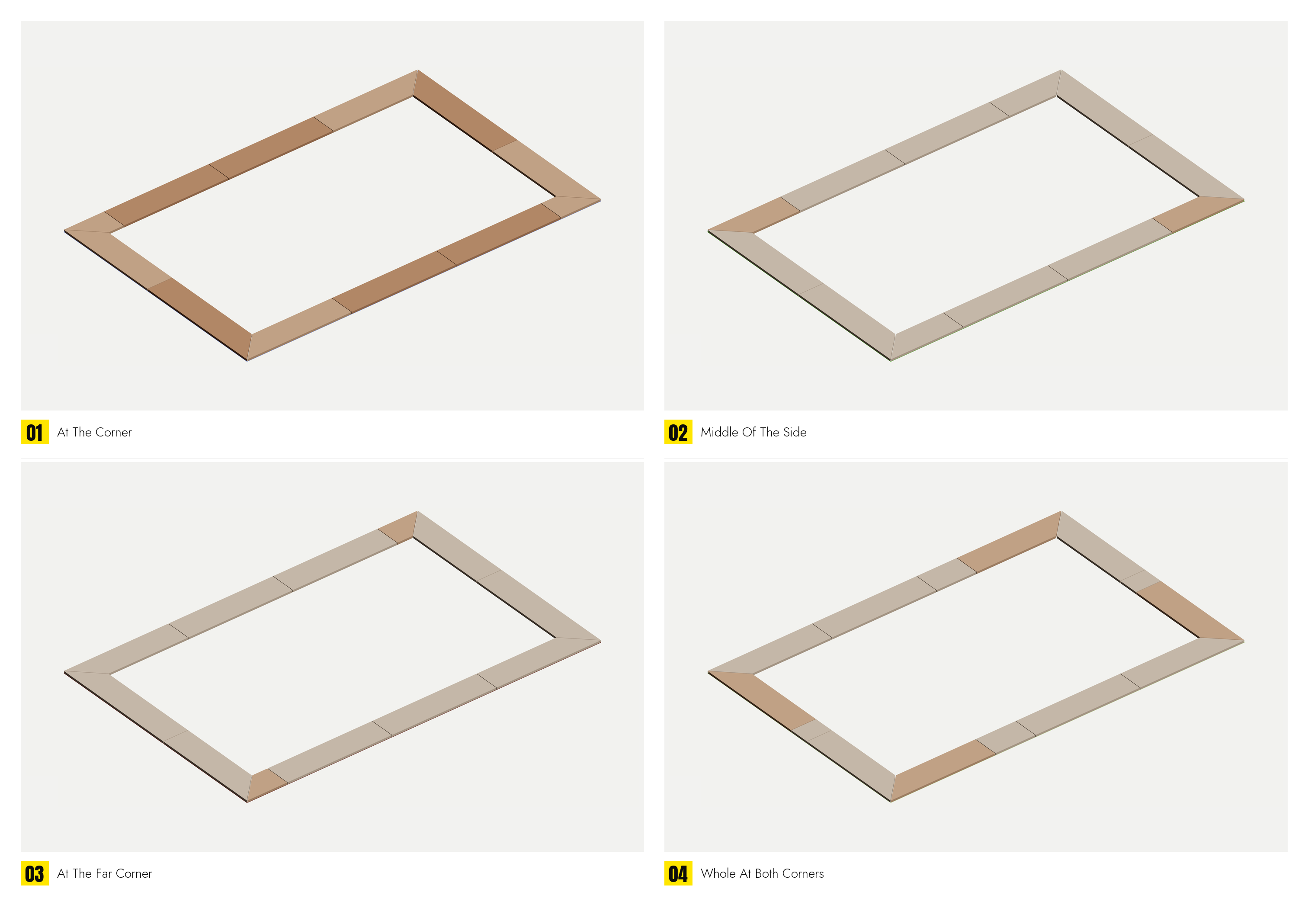
StartsWhere the run's pattern starts along the wall. At The Corner: a whole element at the start, the offcut at the far end. Middle Of The Side: symmetric, both ends cut the same. At The Far Corner: the mirror of the first. Whole At Both Corners, the default: a whole element at each corner and one offcut in the middle of the wall, where it is least noticed. With Trim on there is no offcut and the four are the same.
Free edition: the rollout is shown, but a floor has only one row, so there is nothing to make a band of. Everything here is Pro.